Data recovery in Singapore is the process of retrieving lost, deleted, corrupted, or inaccessible data from storage devices such as hard disk drives (HDDs), solid state drives (SSDs), SD memory cards, USB flash drives, and RAID arrays. HiTech Computer & IT Solutions has been performing data recovery for Singapore residents and businesses since 2008 across three branches in Kembangan, Hougang, and Bukit Timah.
Losing important files — family photos spanning a decade, years of business financial records, or an unfinished thesis — is one of the most stressful experiences a computer user can face. In Singapore, where many of us work and store memories on our devices, data loss can feel overwhelming.
The good news: data recovery in Singapore is accessible, affordable, and successful in the vast majority of cases when handled correctly. Whether your hard drive is making clicking sounds, your SSD stopped being detected, you accidentally formatted your SD card, or your laptop suffered liquid damage, professional recovery services can retrieve your data.
In this guide: common causes of data loss, recovery costs by device type, SSD vs HDD differences, step-by-step instructions, cleanroom requirements, how to choose a provider, and a complete FAQ section.
Common causes of data loss in Singapore
Understanding what caused your data loss is the first step toward recovering it. Different causes require different recovery approaches. HiTech Computer & IT Solutions technicians handle all these scenarios regularly across their three Singapore branches.
Physical hard drive failure
Hard drives contain spinning platters and read/write heads that can fail mechanically. Warning signs include clicking, grinding, or buzzing sounds, unusually slow performance, frequent freezing, and the "hard drive not detected" error. In Singapore's tropical climate, heat and humidity accelerate hard drive failure. If your hard drive is making unusual noises, power it off immediately to prevent further damage.
Accidental deletion or formatting
When files are deleted normally (not securely overwritten), the data remains on the drive until it is overwritten by new data. Stop using the drive immediately for the best chance of recovery. Many Singaporeans bring in drives they have been using for weeks after accidental deletion — by then, much of the original data may already be overwritten.
File system corruption
File system corruption can happen after an improper shutdown, power failure during a write operation, or virus infection. The drive may appear as "RAW" or unreadable in Windows or MacOS, but the actual data is often still intact underneath the corrupted file system. This is one of the most recoverable types of data loss.
Virus and ransomware attacks
Ransomware encrypts your files and demands payment for the decryption key. In Singapore, ransomware attacks on both individuals and SMEs have been increasing. Professional data recovery can sometimes salvage unencrypted remnants or repair corrupted files. Prevention through regular backups and updated antivirus software is the best defence.
Liquid and water damage
Spilling a drink on your laptop is a common accident in Singapore's fast-paced lifestyle. Liquid can short-circuit the storage controller or damage the drive's circuit board, but the storage platters or NAND chips often survive intact. The key is to power off immediately and not attempt to turn the device back on.
Overheating
Singapore's year-round temperature above 30°C means laptops and external drives are especially vulnerable to overheating. Sustained temperatures above 50°C can damage internal components and lead to drive failure. Proper ventilation and avoiding direct sunlight are essential for device longevity.
Data recovery cost in Singapore by device type
Data recovery pricing in Singapore varies based on the type of device, the severity of damage, and the recovery method required. HiTech Computer & IT Solutions offers free diagnosis on all devices and charges only upon successful recovery. Below are typical price ranges across the industry:
| Device type | Typical cost range | Recovery time |
|---|
| Logical recovery (software/firmware) | $80 – $150 | 1–4 hours |
| Hard Disk Drive (HDD) — non-physical | $100 – $250 | Same day to 2 days |
| Solid State Drive (SSD) | $150 – $400 | 2–5 days |
| SD Card / MicroSD | $80 – $200 | 1–3 hours |
| USB Flash Drive / Pen Drive | $80 – $180 | 1–3 hours |
| External Hard Drive (portable) | $120 – $350 | 1–3 days |
| Laptop Data Recovery | $100 – $350 | 1–3 days |
| RAID / NAS Recovery | $300 – $800+ | 3–7 business days |
| Cleanroom Recovery (physical damage) | $300 – $600+ | 3–7 business days |
Important: Most reputable data recovery services in Singapore offer free initial diagnosis. You only pay if the data can be recovered and you choose to proceed. Avoid any service that charges a non-refundable diagnosis fee. HiTech Computer & IT Solutions offers free diagnosis across all three branches with no obligation.
SSD data recovery vs HDD data recovery in Singapore
One of the most important distinctions in data recovery is between traditional hard disk drives (HDDs) and solid state drives (SSDs). They work completely differently, and the recovery approach for each is different. Understanding this can help you set the right expectations for cost and success rate.
HDD data recovery
Hard drives store data magnetically on spinning platters. When a file is deleted, the data stays on the platter until it is physically overwritten by new data. This gives a wide window for recovery — often weeks or months if the drive is not heavily used. HDD failures are typically mechanical: the read/write head crashes into the platter, the spindle motor seizes, or the circuit board burns out from a power surge. In these cases, the platters themselves usually survive intact, and data can be recovered in a cleanroom environment by transplanting the platters into a donor drive. HDD recovery is generally more affordable and has a higher success rate than SSD recovery.
SSD data recovery
SSDs use NAND flash memory chips with no moving parts. While this makes them faster, quieter, and more durable in daily use, it makes data recovery significantly harder for two reasons:
- TRIM technology: When a file is deleted on an SSD, the drive's controller immediately marks those NAND blocks as available for rewriting. Many SSDs run a background TRIM process (especially on MacOS and Windows 10+) that permanently erases deleted data. Once TRIM has run, that data cannot be recovered — not even in a cleanroom.
- Controller complexity: Each SSD brand and model uses a different controller chip and proprietary firmware. Recovery often requires matching the exact controller and repairing or bypassing the firmware. This is highly specialised work that not all data recovery services can handle.
Quick tip: If your SSD fails or stops being detected, minimise power-on time. Every minute the drive is powered on after a controller failure reduces the chance of full recovery. Bring it to a professional immediately rather than trying DIY fixes.
What to do when you lose data
Follow these steps in order. The actions you take in the first few minutes after discovering data loss have the biggest impact on whether your files can be recovered.
- Stop using the device immediately. Every second the drive is powered on risks overwriting the very data you want to recover. Do not install recovery software, do not browse the web, do not save new files to the same drive.
- Do NOT run DIY recovery software on the affected drive. Tools like Recuva, EaseUS Data Recovery Wizard, or TestDisk write temporary files and may overwrite the data you are trying to recover. These tools are safe only for recently deleted files on an otherwise healthy drive.
- For water damage: Power off immediately. Do not attempt to turn the device on to "check if it still works" — liquid conducts electricity and turning it on can short-circuit the drive. Remove the storage drive if possible (many laptops have user-removable SSDs) and bring it to a professional.
- For clicking drives: Power off immediately. A clicking sound means the read/write head is physically contacting the platter surface. Every second of operation scrapes more of the magnetic coating off the platter, causing permanent data loss that even a cleanroom cannot reverse.
- Contact a professional data recovery service that offers free diagnosis. Describe exactly what happened, what sounds you hear (if any), and what error messages appear on screen.
- If the data is recoverable, the service will provide a quote and estimated timeline. Decide whether to proceed based on the value of the data versus the cost.
- Once recovered, copy the data to a new healthy drive immediately. Do not reuse the failed drive for storage — it may fail again.
Warning: Do not power on a clicking or grinding hard drive. Do not open the hard drive casing yourself. Do not freeze the drive — this is a persistent myth that introduces condensation and destroys the platters permanently. Do not run chkdsk or Disk Utility on a failing drive.
What NOT to do when you lose data
Many data loss situations are made worse by well-intentioned but incorrect first actions. Here are the mistakes HiTech Computer & IT Solutions sees most often:
- Do not power on a clicking or grinding drive — this causes irreversible physical damage to the platters.
- Do not run disk repair tools like chkdsk, fsck, or Disk Utility First Aid on a failing drive — these tools write data during the repair process.
- Do not open the hard drive casing — hard drives must be opened only inside a certified Class 100 cleanroom. A single dust particle landing on a platter can destroy data permanently.
- Do not attempt DIY software recovery if the data is valuable — software-based recovery is only appropriate for accidentally deleted files on a completely healthy drive.
- Do not freeze the hard drive — this old myth introduces condensation inside the drive, rusting the platters and destroying data permanently.
- Do not format the drive or reinstall the operating system — this overwrites the file system and drastically reduces the chance of recovery.
Do you need a cleanroom for data recovery in Singapore?
Not every data recovery case requires a cleanroom. Logical recoveries — accidental deletion, file system corruption, formatted drives — can be handled with specialised software tools in a standard workshop. But for physically damaged hard drives where the internal platters are exposed, a cleanroom is absolutely essential.
A Class 100 cleanroom filters air to fewer than 100 particles per cubic foot — approximately 10,000 times cleaner than a typical hospital operating theatre. Hard drive platters float at a height of approximately 3 to 5 nanometres above the read/write head. Even a microscopic dust particle (typically 0.5 to 10 micrometres) can cause a head crash and destroy data permanently.
When choosing a data recovery service in Singapore, ask whether they have an on-site cleanroom or a trusted cleanroom partner for physical hard drive recovery. Services without cleanroom access will outsource physically damaged drives, adding cost and turnaround time. HiTech Computer & IT Solutions works with certified cleanroom partners for severe physical recovery cases requiring platter transplants.
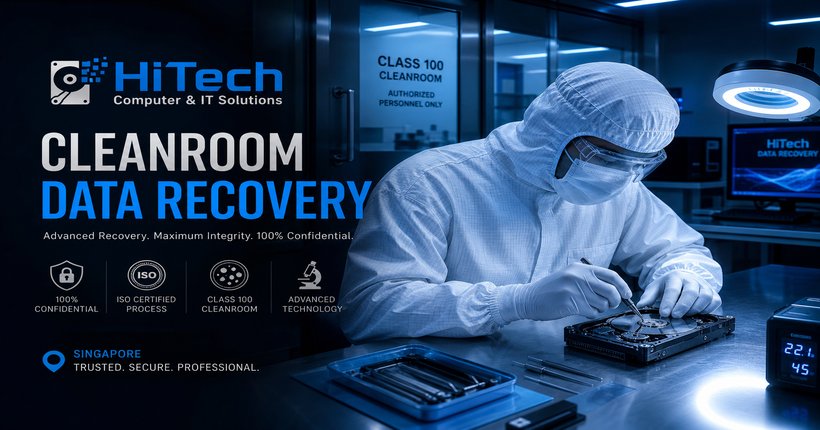 A Class 100 cleanroom environment — essential for physically damaged hard drive recovery. HiTech Computer & IT Solutions partners with certified cleanroom facilities in Singapore.
How to choose a data recovery service in Singapore
Not all data recovery services operate at the same standard. Here is what to look for when choosing a provider:
Free diagnosis first. A reputable service offers a free, no-obligation diagnosis. You should know exactly what is wrong and how much it costs before any work begins. HiTech Computer & IT Solutions provides free diagnosis at all three branches.
No recovery, no fee. Ethical data recovery services only charge if they successfully recover your data and you accept the result. If nothing can be recovered, you should not pay a cent.
Cleanroom capability or partnership. For physically damaged hard drives, the provider must have on-site Class 100 cleanroom access or a documented partnership with a certified cleanroom facility. Always ask before handing over a physically damaged drive.
Transparent pricing. The provider should give clear price ranges based on device type and damage severity during the diagnosis, not vague "from $XX" quotes that balloon later.
Experience and customer reviews. A provider with years of experience and a strong track record is more likely to handle complex cases successfully. HiTech Computer & IT Solutions holds a 4.9★ rating with over 1,050 verified customer reviews across three Singapore locations.
Data privacy and confidentiality. Your recovered data may contain sensitive personal or business information. Ensure the service has a clear data privacy policy and does not retain copies of your data after delivery.
Preventing future data loss
The best data recovery is the one you never need. Here are practical steps to protect your data going forward:
- The 3-2-1 backup rule: Keep at least 3 copies of your data, on 2 different types of storage media, with 1 copy stored off-site or in the cloud. This single habit prevents virtually all permanent data loss.
- Use cloud backup: Services like Google Drive, Dropbox, OneDrive, or iCloud automatically sync your important files in the background. For business data, consider a dedicated backup solution like Backblaze or a NAS with RAID.
- Monitor drive health: Free tools like CrystalDiskInfo (Windows) or DriveDx (Mac) can detect early warning signs of drive failure — reallocated sectors, pending errors, rising temperatures, and degraded performance metrics.
- Replace drives proactively: Industry data from Backblaze's 2025 drive statistics shows annualised hard drive failure rates range from 0.41% for enterprise-grade drives to over 8% for consumer-grade drives after 5 years. If your drive is over 4 years old, consider replacing it before it fails.
- Use a UPS: An uninterruptible power supply protects against power surges and sudden shutdowns that can corrupt file systems, especially during write operations.
- Avoid overheating: Keep your laptop or external drive in a well-ventilated area. Use a cooling pad for gaming laptops or intensive workloads. Avoid leaving devices in direct sunlight or enclosed spaces.
Frequently asked questions about data recovery in Singapore
How much does data recovery cost in Singapore?
Data recovery costs in Singapore typically range from $80 to $600+ depending on the device type and damage severity. Simple software-based recoveries start around $80–$150, physically damaged hard drives requiring cleanroom work cost $300–$600, and RAID or NAS recovery can range from $300–$800+. HiTech Computer & IT Solutions offers free diagnosis so you know the exact cost before any work begins.
Can data be recovered from a dead hard drive?
Yes, in most cases. If the failure is logical — corrupted file system, accidental deletion, formatted drive — recovery is often straightforward using software tools. Even physically damaged drives with clicking sounds can frequently be recovered by transplanting the platters into a donor drive inside a cleanroom. The success rate depends almost entirely on whether the platter surfaces themselves are scratched or damaged.
How long does data recovery take in Singapore?
Simple recoveries such as accidentally deleted files or formatted SD cards can be completed in 1 to 3 hours on the same day. Physically damaged hard drives requiring cleanroom recovery may take 3 to 7 business days. Complex RAID array or NAS recovery can take longer depending on the configuration. The service provider should give you a clear timeline after the initial diagnosis.
Is SSD data recovery different from HDD recovery?
Yes, fundamentally. SSD recovery is significantly more challenging and expensive than HDD recovery because SSDs use TRIM technology that permanently erases deleted data in the background. Once TRIM has been executed, the data cannot be recovered by any method. HDDs store data magnetically, and deleted files remain physically present on the platters until overwritten. HDD recovery has a higher success rate and is generally more affordable.
Can I recover data from a water damaged laptop?
Data can often be recovered from a water damaged laptop, provided the storage drive itself was not physically destroyed. The critical step is to power off the device immediately — do not attempt to turn it on to "check if it works" as that can short-circuit the drive. If possible, remove the storage drive (many laptops have easily accessible SSDs) and bring just the drive to a data recovery service. HiTech Computer & IT Solutions handles water damage cases regularly across all three branches.
What causes sudden data loss?
The most common causes are physical hard drive failure, accidental deletion, file system corruption, virus or ransomware attacks, power surges during write operations, liquid damage, overheating, and firmware corruption. In many cases, the drive gives warning signs before complete failure — unusual sounds, slow performance, or frequent crashes — which is why regular monitoring and backups are so important.
Where can I get data recovery in Singapore?
Data recovery services are available across Singapore from IT repair shops and specialised recovery centres. Look for providers with free diagnosis, cleanroom access for physical recovery, transparent pricing, and verified customer reviews. HiTech Computer & IT Solutions has three branches in Kembangan (Changi Road), Hougang (Hougang Ave 8), and Bukit Timah (Jalan Jurong Kechil) with free island-wide pickup and delivery.
Can data be recovered from a formatted SD card?
Yes, in the majority of cases. When an SD card is formatted, the file system is rebuilt but the underlying data remains on the flash memory chips until it is overwritten by new files. The most important step is to stop using the SD card immediately after accidental formatting. Do not save new photos or files to it. A professional data recovery service can typically recover photos, videos, and documents from formatted SD cards. HiTech Computer & IT Solutions offers free diagnosis on SD card recovery and can advise on success probability upfront.